
Browse our FAQs or search through them on AskGov.
LAUNCH AND MODES
1. What are the payment modes available? Which credit cards/ debit cards are supported?
-
For online payment, all VISA and MASTERCARD debit and credit cards are supported.
-
With effect from 19 May 2026, PayNow QR Payment, Apple Pay, and Google Pay are also available.
-
Kindly note that Apple Pay and Google Pay are temporarily unavailable.
2. What is PayNow QR payment?
-
PayNow QR payment allows you to make payments by scanning a PayNow QR code using a participating bank's mobile banking application.
-
It is a quick, secure, and contactless payment method.
3. What are Apple Pay and Google Pay?
-
Apple Pay and Google Pay are digital wallet payment methods that allow users to make secure online payments using cards saved on their mobile devices.
-
These payment methods provide a fast, convenient, and contactless payment experience.
-
Kindly note that these payment methods are temporarily unavailable.
4. Which mobile banking applications can I use for PayNow QR payment?
-
You may use mobile banking, mobile wallet, or payment application in Singapore that supports PayNow QR payments.
-
The availability of PayNow QR payment depends on the features and services supported by your bank or payment service provider.
-
For more information on PayNow QR payment support, please refer to your bank's or payment service provider's application.
5. Why has PA implemented PayNow QR payment, Apple Pay, and Google Pay?
-
PA has implemented these payment methods to:
- Provide residents with more convenient payment options
- Support Singapore's Smart Nation initiative towards a cashless society
- Offer secure and contactless payment methods that residents are familiar with
- Make transactions more accessible and convenient for residents who prefer digital payment methods.
PAYMENTS AND RECEIPTS
6. How do I make payment using PayNow QR?
-
To make payment using PayNow QR, please follow the steps below:
- Take a screenshot of the PayNow QR code and save it to your mobile phone
Via Desktop
- Launch your preferred mobile banking, mobile wallet, or payment application on your mobile device
Note: The merchant name may be reflected in your banking or payment application as "STRIPE PAYMENTS SINGAPORE PTE. LTD.".
7. Will I be charged additional fees for using PayNow QR payment?
-
No. There are no additional charges for using PayNow QR payment.
8. How can I verify that my online payment is successful? If the payment failed, what steps should I take?
- After completing your payment, a "Payment Success" page will be displayed to confirm that your transaction has been processed successfully.
- A Payment Confirmation email and a Booking Confirmation email will be sent to your registered email address. Please check your inbox and/ or junk mail folder.
- You may also check your bank or card statement to confirm that the payment has been deducted.
- If your payment was unsuccessful, please try the following:
- If the issue persists, please submit a screenshot of the error via PA Feedback Form.
- If payment was successful but booking confirmation was not received, please contact us via PA Feedback Form and provide:
9. What happens if my PayNow QR payment fails?
-
If your payment fails, an error message will be displayed.
-
Please check your internet connection and bank account balance before trying again.
-
If the issue persists, please use an alternative payment method or contact your bank.
10. What should I do if I accidentally made a wrong payment?
-
Please contact the PA Contact Centre at 6225 5322 and provide:
- Transaction date
- Transaction amount
- Reference number. -
Our hotline operating hours are as follows:
- Monday - Sunday: 8:00 am to 6:00 pm
- Public Holidays: Closed
- Eve of Christmas, New Year and Chinese New Year: 8:00 am to 1:00 pm. -
Alternatively, you may submit your feedback via PA Feedback Form.
11. How will the receipt be issued for online payment?
-
An electronic receipt and booking confirmation will be sent to the payer via email upon successful payment.
- You may also log in to onePA Portal and access Transaction History to download your receipt.
-
There is no need to print the receipt. Community Clubs/ Centres, PAssion WaVe outlets and imPAct@Hong Lim Green can verify bookings using your identification number.
12. If my online payment fails, will my transaction be processed?
-
No. The booking or reservation will be cancelled if payment is not successful.
13. Can I pay for another person?
-
Yes, you may pay for another person, except for SkillsFuture@PA and online courses.
CANCELLATIONS AND REFUNDS
14. Can I cancel my online or over-the-counter payment?
-
Registrations and bookings are confirmed upon successful payment.
-
If you have a valid reason, please contact the Community Club/ Centre, PAssion WaVe outlet, or imPAct@Hong Lim Green offering the product.
-
Refund requests are subject to review and approval.
15. Can I get a refund for my online or over-the-counter payment?
-
Refunds are generally not allowed unless the Community Club/ Centre, PAssion WaVe outlet, or imPAct@Hong Lim Green cancels or reschedules the course, activity, or booking.
-
In such cases, the respective outlet will contact the payer directly regarding the refund process.
-
If you wish to request a refund for valid reasons, you must complete a Refund Request Form at the respective outlet.
-
All refund requests are subject to review and approval.
16. How do I know if my refund for PayNow QR, Apple Pay, or Google Pay has been completed?
-
Refunds will be credited back to the original payment method used:
- PayNow QR: refunded to the bank account linked to the PayNow transaction
- Apple Pay/ Google Pay: refunded to the underlying card linked to the digital wallet. -
A separate notification may not be sent when the refund is processed. We recommend checking your bank or card statement to confirm.
-
To check whether your refund has been completed, please refer to:
- Your bank account statement or banking app transaction history (for PayNow QR refunds), or
- Your credit or debit card statement linked to Apple Pay/ Google Pay
-
Refund processing time may vary depending on your bank or card issuer.
OTHERS
17. Are PayNow QR, Apple Pay, and Google Pay payment secure?
-
Yes. These payment methods use secure and encrypted technologies to protect your payment information.
-
Transactions require authentication such as fingerprint recognition, facial recognition, device passcode, or banking PIN.
-
Kindly note that Apple Pay and Google Pay are temporarily unavailable.
18. Who can I contact if I need help with PayNow QR, Apple Pay, and Google Pay QR payment?
-
For payment-related issues, please contact your bank directly.
-
For other enquiries, you may approach staff at the Community Club/ Centre or contact PA Contact Centre at 6225 5322
-
Our hotline operating hours are as follows:
- Monday - Sunday: 8:00am to 6:00pm
- Public Holidays: Closed
- Eve of Christmas, New Year and Chinese New Year: 8:00 am to 1:00 pm
-
Alternatively, you may submit your feedback via PA Feedback Form.
Browse our FAQs or search through them on AskGov.
1. Why are some badminton courts not offered online?
-
Each CC will have at least one badminton court available for online booking. There are some badminton courts which are available only for counter bookings for walk-in residents who may not be digitally savvy.
2. Would I be able to play pickleball on the badminton courts at the CC(s)?
-
Some CCs allow access to their badminton courts for either badminton, pickleball, or both. Please note that the decision to allow the use of the badminton court for badminton, pickleball, or both is at the discretion of the CCs.
-
The following CCs provide access to their badminton courts for pickleball: Buona Vista CC, Cairnhill CC^, Hillview CC^, Hwi Yoh CC, Kebun Baru CC^, Tanglin CC, Toa Payoh East CC, and Toa Payoh West CC.
-
Please note that the above list of CCs is subject to change without prior notice. Terms and conditions apply. You can contact them for further details.
^Have to book out entire hall
-
You will not be able to select a booking date for a facility if the facility is fully booked or closed for booking (e.g. for maintenance, event, activity, etc.) for that day.
4. How far ahead can I book a facility?
-
You may book facilities such as badminton courts, table-tennis tables, etc. 15 days in advance.
-
The new booking window for in-demand facilities starts at 10pm each day.
-
For example, on 1st Oct, you can book a badminton court in advance up to 16th Oct. On 1st Oct 10pm, you can book a badminton court in advance up to 17th Oct.
-
For other facilities, such as conference rooms, meeting rooms, studios, etc., the booking window may vary, and you can submit a request form for the facility on the Community Club/Centre detailed page. The CC will contact you to assist you on your request.
5. How many facility slots can I book at one go?
-
Each payer can book up to 2 facility slots per day (1 hour per slot). This is to allow different residents to enjoy our facilities.
6. Can I change the timing of my facility booking?
-
No cancellation, replacement or refund will be allowed once a booking is confirmed.
-
However, if you have a valid reason, you may contact the Community Club/ PAssion WaVe Outlets/ imPAct@Hong Lim Green directly to request a change, subject to the availability of the facility.
7. Will I lose the facility slot if I reserved the slot online previously?
-
Booking of facilities is based on a first-come, first-served basis and confirmed only after payment.
-
Please proceed to make payment within 15 minutes of selecting the facility slot(s), as the reservation of the slot(s) will be released after that.
-
For facility booking request sent via online form to the CC, the CC will contact you to make payment as required to confirm your booking.
8. Can I pay for my online facility booking via cheque?
-
Online booking can only be paid using the electronic payment modes available like debit/ credit cards and (Coming Soon) PayNow QR.
9. Why do fees differ among PA outlets?
-
Fees are dependent on factors such as venue/ location and costs of providing the product.
10. How can I find out more about a course or event?
-
You can search for a course or event using the Search “
 ” icon, or click on Courses or Events tab at the top menu header bar and search for the desired items under the respective quick search tab.
 -
After clicking into the individual course or event, more details will be shown e.g. description, venue, vacancies.
11. Can I register for a course on behalf of another person?
-
Yes, you can register a course and pay on behalf of another person (except for SkillsFuture@PA and online courses). However, you will have to provide their NRIC and personal particulars during the registration process.
12. Can I register for a course that has already commenced?
-
In general, courses with materials are available for online booking till 3 days before course starts and courses with no materials are available for online booking till course starts. Please refer to the table below for more information.
-
There are instances where the online registration closing date may be set to close earlier than indicated in the table below. Hence, you are encouraged to refer to the specific course details page for the online registration closing date.
-
Once course has commenced, please proceed to the PA outlet to enquire if it is possible to sign up.
|
Type of class |
Online registration closing date |
Example |
|
For classes with material fees |
3 calendar days before class start date |
If class is starting on 18 Mar, online registration will close on 14 Mar, 11.59pm |
|
For classes without material fees |
By class start date |
If class is starting on 18 Mar 6pm, online registration will close on 18 Mar, 5.59pm |
|
For SkillsFuture@PA or SkillsFuture@PA (SA) classes |
7 calendar days before class start date |
If class is starting on 18 Mar, online registration will close on 10 Mar, 11.59pm |
|
|
|
|
13. How do I use the ‘Favourites’ under the Account?
-
You can choose to save a course or event as a Favourite by clicking on the
 . The product will be saved in the user account under ‘Favourites’ and can be retrieved at the next log-in to the account.
14. Is there a waiting list if registration is full?
-
If the course or event is full, you may click on ‘Add to waiting list’. A notification either via SMS or email will be sent to you if there are vacancies or released slots. Registrations are on a first-come, first-served basis.
15. Will I lose the course/ event registration if I do not pay for it?
-
Booking of course/event is based on a first-come, first-served basis and confirmed only after payment. Please proceed to ‘Book now’ and make payment within 15 minutes, as the reserved slot(s) or ticket(s) will be released after that.
16. How do I view my bookings/ registrations and transaction history?
-
Upon successful payment online, an electronic booking confirmation will be sent via email to the payer.
-
Alternatively, to view your bookings, login to your profile on onePA.gov.sg, click on your Name at the top menu header bar and select My Dashboard. Bookings will be classified according to Upcoming, Ongoing and Completed.
-
To view past transactions and retrieve transaction receipts, click on your Name at the top menu header bar (after login) and select Transactions History.
17. How can I cancel my registration/ booking?
-
Registrations/bookings are confirmed once you have paid for them. However, if you have a valid medical reason, please contact the organising Community Club/ PAssion WaVe Outlets/ imPAct@Hong Lim Green directly for your request to be considered.
18. How do I register for a user account on onePA?
-
You will need a Singpass account to sign in before you can proceed to create a user account with onePA.
-
The system will prompt you to create a onePA account, if applicable.
19. What are the benefits of registering for a user account on onePA?
The onePA user account enables you to:
-
view your transaction history (up to last 3 months' transactions),
-
view membership renewal information & renew membership,
-
view customised promotions upon login,
-
download and reprint receipts (up to last 3 months' transactions),
-
change personal particulars and preferences,
-
pay for any outstanding products selected.
20. How can I apply the relevant promotional discounts during registration of courses or activities?
-
At the Payment Summary page, you will be able to apply the Promo codes (if available).
-
Any applicable electronic discount will be reflected at the Payment Summary page.
21. Will I be able to book and pay for any product at any Community Club/ PAssion WaVe Outlets/ imPAct@Hong Lim Green?
-
Yes, you will be able to book and pay for courses and resources at any Community Club/ PAssion WaVe/ imPAct@Hong Lim Green, except in instances where selected products are restricted to over-the-counter registration at specific outlets.
-
However, any refund or withdrawal request can only be requested at the Community Club/ PAssion WaVe Outlets/ imPAct@Hong Lim Green offering the product.
Browse our FAQs or search through them on AskGov.
1. What features does the onePA website offer?
With the onePA website, you will be able to:
-
Find a course, event, interest group, facility, including Community Clubs/ Centres, Residents’ Networks/ Residents’ Committees/ Neighborhood Committees etc using the enhanced Search “
 ” icon located on the top menu header bar.
 -
Filter for available slots and PA outlets when you look for a course, event, or facility.
-
Easily locate Community Clubs/ Centres, Residents’ Committees/ Residents’ Networks, PAssion WaVe Outlets and imPAct@Hong Lim Green within the directory pages under the “About Us” tab located on the top menu header bar (or hamburger menu) and discover what they have to offer.
-
Save your family member’s profile for ease of subsequent booking(s). The next time you log in and return to book a PA offering for a family member, you can retrieve his/ her profile with just a click.
-
View all your favourites, bookings, online classes & transaction history in your profile’s dashboard.
-
[COMING SOON] Pay for transactions using PayNow QR code with your preferred bank application.
2. Where can I find the contact details of a Community Club (CC)/ Residents’ Network (RN)/ Residents’ Committee (RC)/ Neighbourhood Committee (NC) or the nearest CC/ RC/ RN/ NC to my home?
-
Click on the “About Us” tab and depending on what you are looking for, select from either the option of “Locate a Community Club/ Centre” or “Locate a Residents’ Network/ Residents’ Committee/ Neighbourhood Committee”. Enter the name of the CC or RC/ RN/ NC and click on the Search “
” icon. Alternatively, you may browse the listing and click on the name of the CC or RC/ RN/ NC to view more details. -
You may find a specific course, event, interest group or facility using the Search “
” icon located on the top menu header bar. At the search results page, you may further narrow your search by using the filters provided under the search textbox. -
Alternatively, you may also click on the Courses, Events, Interest Groups or Facilities tab at the top menu header bar and access the categories/ sub-categories to browse the respective pages for the desired items.
-
You can also use the Search “
” icon located on the top menu header bar to search for the CC and retrieve the details.
Browse our FAQs or search through them on AskGov.
1. How do I login to onePA portal?
-
The Login with Singpass button can be found at the top menu header bar

-
Clicking it will prompt you to log in with your SingPass via password login or the Singpass mobile app.
-
Upon successful login, you shall be automatically redirected back to onePA.gov.sg.
2. What do I do if I do not have a SINGPASS?
-
Please visit https://www.singpass.gov.sg to register for a SINGPASS account.
3. Do I need to sign-out?
-
We strongly advise that you sign out after each session. If you have signed in, you can find the “Log Out” tab as you mouse over your name initial at the top of the screen. Click on the “Log Out” to log out of onePA.
-
If you do not log out, the system will automatically log you out after 30 minutes of non-activity to reduce any misuse.
4. After I approved the onePA account login via Singpass mobile app, the Singpass page is non-responsive and does not bring me back to the onePA website. What should I do?
-
Please visit https://www.onepa.gov.sg and login again.
5. When I try to log in to my account via Singpass, I see an error prompt that says “Oops, we can’t find the page that you are trying to access". What should I do?
- Please visit https://www.onepa.gov.sg and login again.
6. When I try to login to my account via Singpass, I see an error prompt that says "This services.pa.gov.sg page can’t be found". What should I do?
-
Please visit https://www.onepa.gov.sg and login again.
7. When I try to log in to my account via Singpass, the onePA website loaded the “Create Profile” form even though I have an existing onePA profile ". I attempted to log in multiple times but face the same issue. What should I do?
- Please visit https://www.onepa.gov.sg and login again.
- Please notify us that you are still facing this issue via www.pa.gov.sg/feedback and provide us with the email address and/or NRIC that was used to register your onePA profile for further investigation.
Browse our FAQs or search through them on AskGov.
1. What are Promo Codes?
-
Promo codes typically allow users to enjoy special discounts and perks and their usage is subject to terms and conditions. Users will need to apply the promo codes at the Payment Summary page before checkout.
-
Please note that the availability of promo codes is not guaranteed and may vary from month to month. You can refer to the relevant FAQ(s) below to learn how you can collect and redeem the available promo codes. Terms and conditions will apply.
2. Can I collect the Promo Code coupon first and use it later?
- You will be able to collect the coupon first for subsequent usage. Redemptions will be on a first-come first-served basis and whilst stocks last.
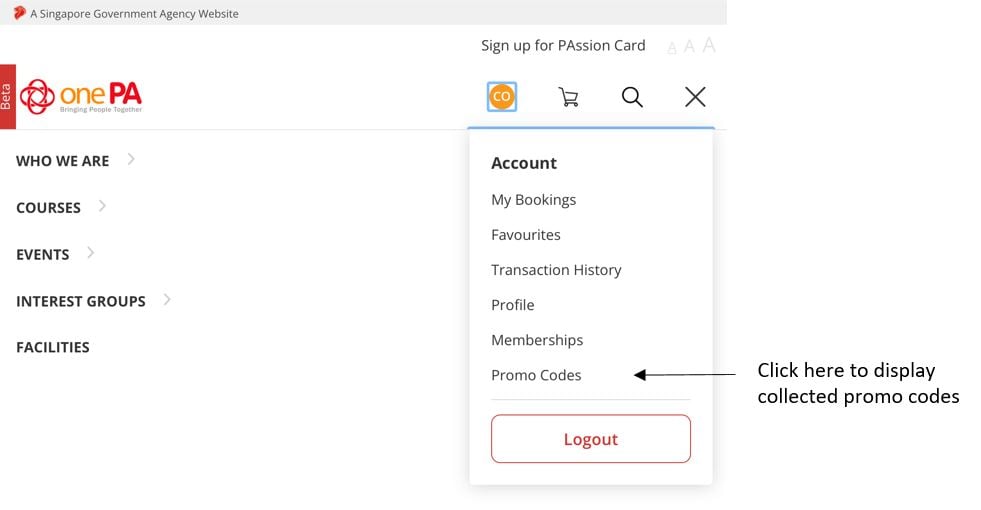
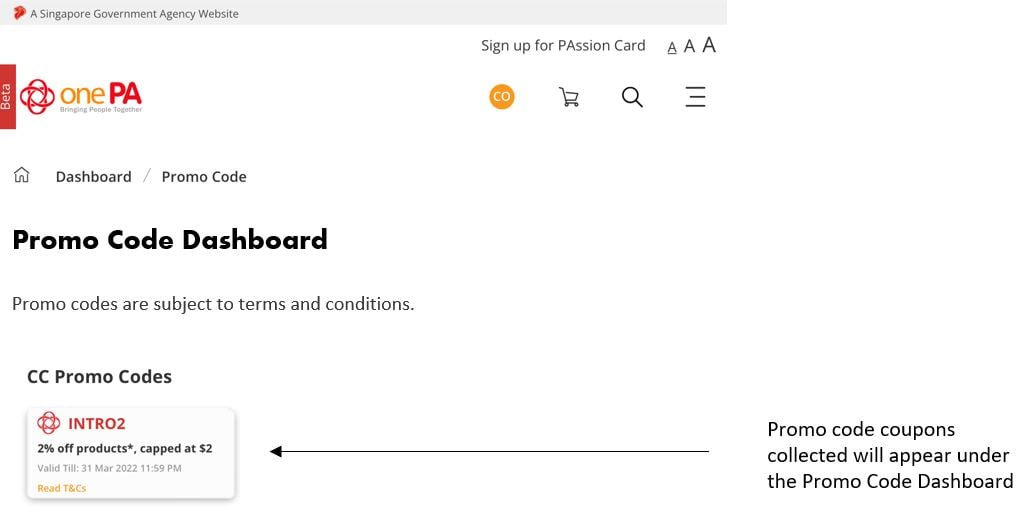
- Here we are using INTRO2 promo code as an illustration. To collect the Promo Code coupon, you will need to (refer to screenshots below):
1. Log in to your account using Singpass
2. Go to any of the CC pages (About Us> Locate a Community Club/ Centre > Select any CC)
3. Scroll down to the Promo Code section to view available promo codes
4 .Tap on the “Collect” located to the right of the coupon to collect
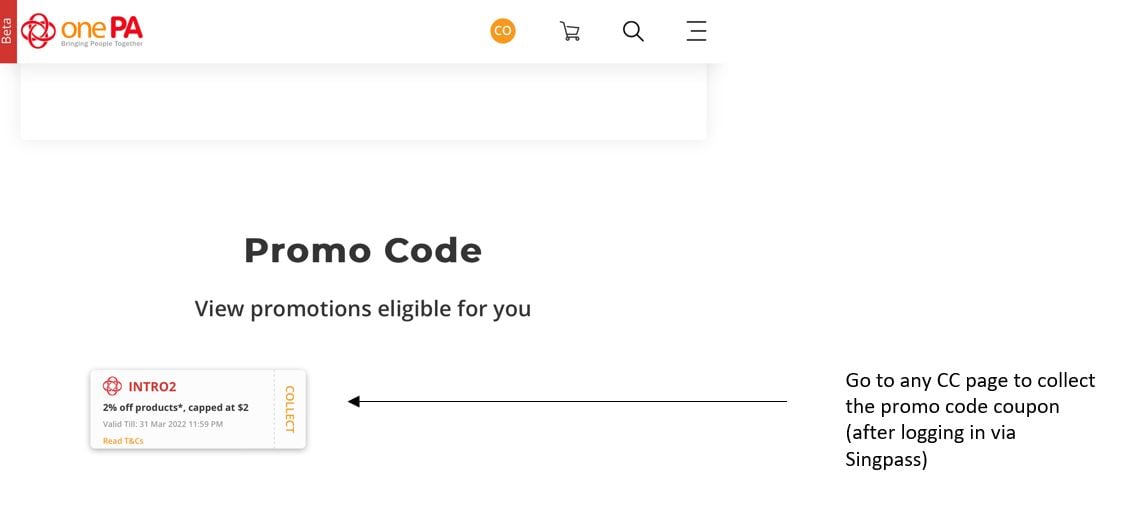
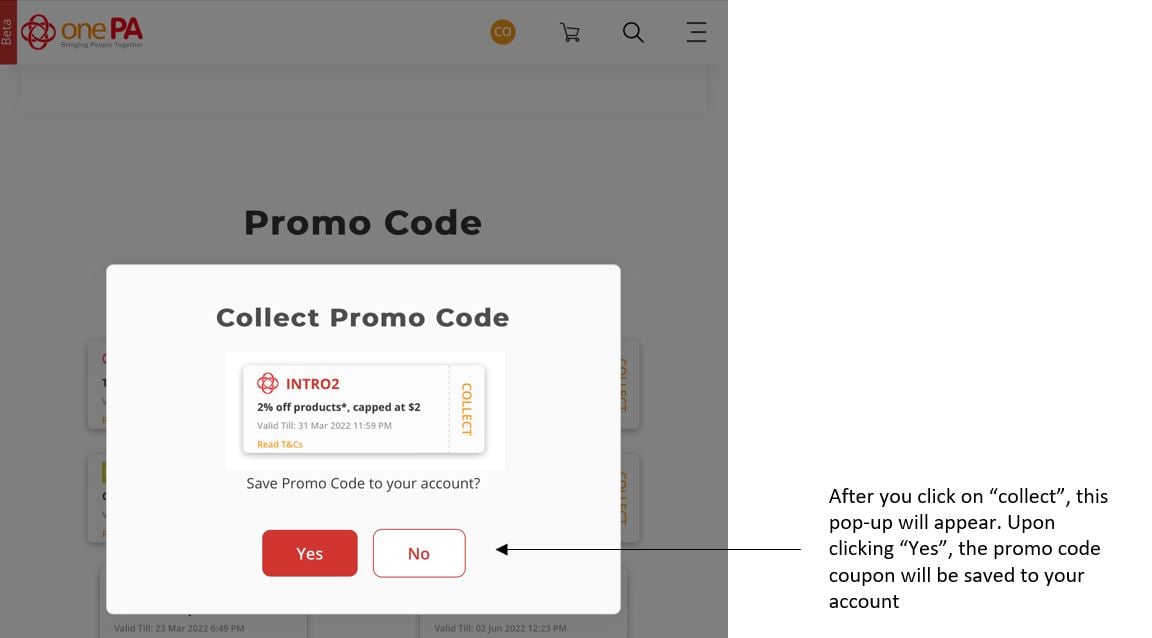
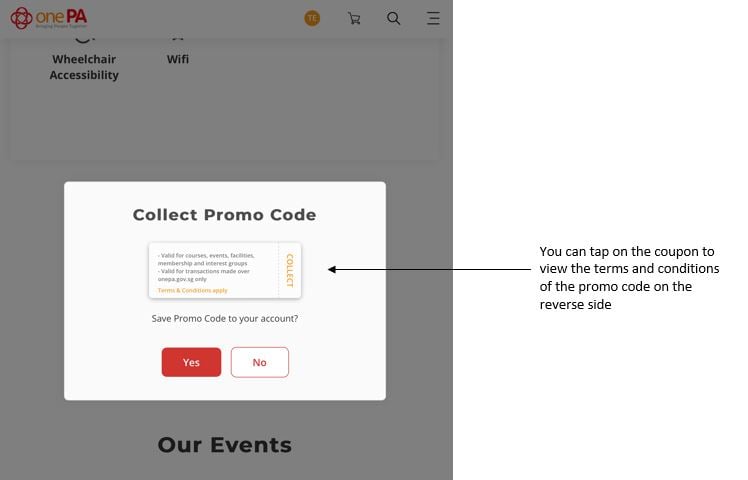
5. Once collected, the Promo Code coupon can be found in your profile under “Promo Code Dashboard” [accessible via User Profile (after Singpass login) > Promo Codes]
3. How can I utilise a Promo Code?
- Promo Codes are currently only applicable when residents sign up or register via www.onePA.gov.sg and their usage is subject to terms and conditions.
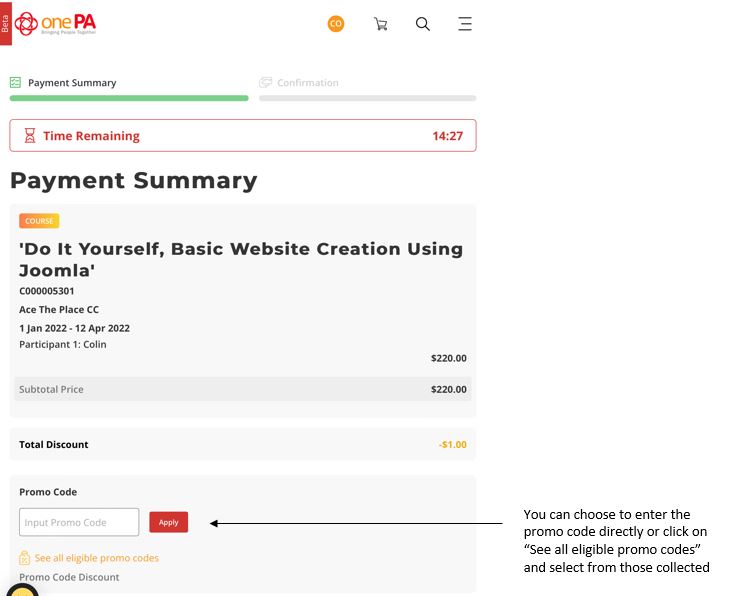
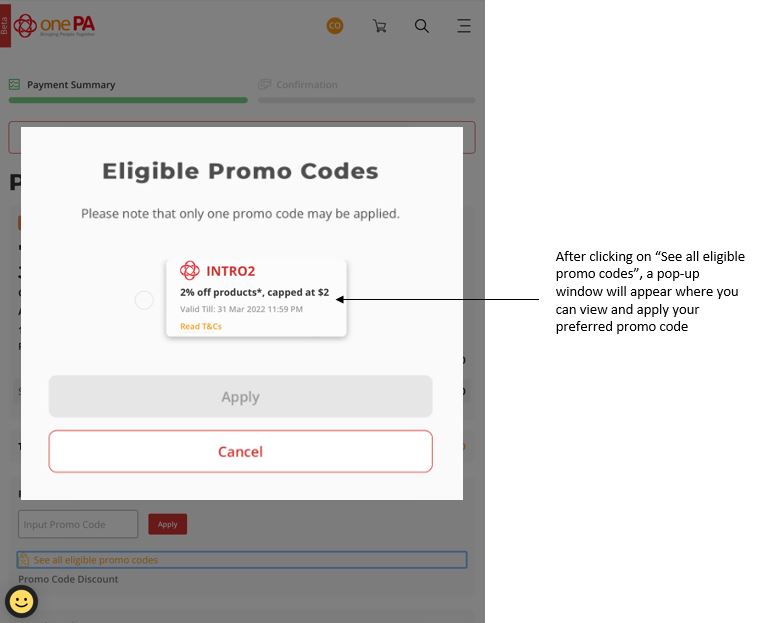
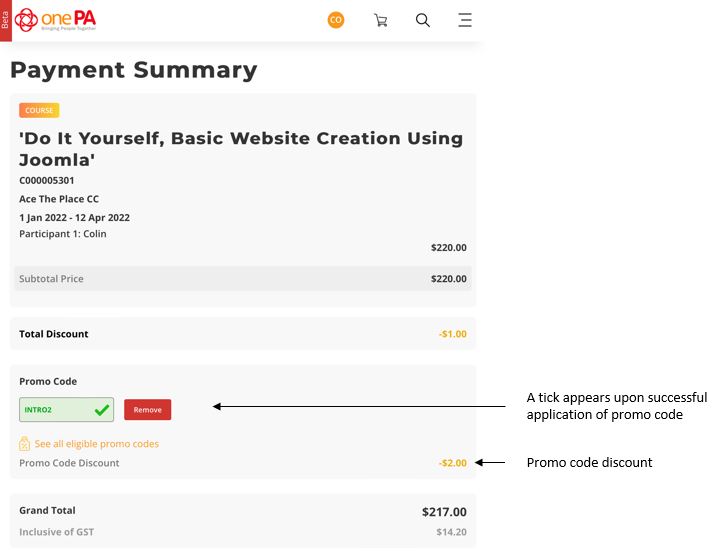
- Here we are using INTRO2 promo code as an illustration. For you to enjoy the Promo Code discounts, you will need to enter ‘INTRO2’ at the Promo Code section during payment checkout. Alternatively, you can click on “See all eligible promo codes” after collecting the coupon(s) and select the one which you want to utilise. Please refer to the screenshots below for more details (please note that the data shown is mock data).
Steps on how Promo Code can be entered/selected at Payment Summary page
4. What discounts are available for PAssion Card Members?
- PAssion Card Members will continue to enjoy applicable preferential PAssion Card membership rates for selected courses, activities and facilities
5. Are Promo Codes stackable?
- Promo Codes are not stackable. Only 1 Promo Code can be used during payment checkout, subject to terms and conditions.
Rates
Browse our FAQs or search through them on AskGov.
1. Are there any online discounts for PAssion Members?
-
PAssion Members will be eligible for discounted fees on products (courses, activities, resource booking) offering PAssion Member's rate(s).
2. Why do facility charges and course fees differ from Community Club/PAssion WaVe to Community Club/PAssion WaVe?
- Facility charges are dependent on, amongst other factors, the location of the facility, the demand, time of the day and day of the week.
- Course fees are dependent on, amongst other factors, the venue where the course is held and the demand.
Browse our FAQs or search through them on AskGov.
1. How do I update my personal particulars under onePA.gov.sg?
-
You can update your personal particulars by accessing your Profile.
-
Hover over the name located on the top menu header bar. Click on Profile.
-
Click on Edit “
 ” icon to edit Account Information under the Profile tab.
 -
You may click on Retrieve MyInfo “
 ” icon to retrieve MyInfo Data which will then be auto-populated. You can also choose to click on Clear MyInfo “
 ” icon if you want to manually enter details that are different from MyInfo records.
2. How can I create additional profile(s) for subsequent bookings?
-
You can save your family member’s profile while booking a course. During the sign up process, under the “Add Participant(s)” page, you may choose to create/update profile for future use. This automatically saves the profile information, so the next time you log in and return to book a PA offering, you can retrieve his/ her profile at the booking page.
-
You may also edit the saved profile under your Profile> “Saved Profiles” tab.
3. How can I add Supplementary Members under my Profile?
-
At the profile page, find the “Supplementary Members” tab and enter your child(ren)'s details.
-
PAssion Supplementary Membership is only applicable to children below 18 years old. Only principal Members can apply on behalf of their child/children.
Last Updated: 19 May 2026 9:00 AM